
How to review and resolve a wash quality report
Work a customer or staff-submitted wash quality report from start to finish so the issue is owned and closed out: find it in the inbox, see what went wrong, set the at-fault equipment, record how you resolved it, and escalate to a damage claim if there was vehicle damage. For managers and shift leads who handle incoming feedback.
When to use this
Promote a report to a claim from here when an existing wash report already captures the damage and customer details; log a damage claim directly only when there is no report to start from.
Before you start
- Where: Store view.
- Permission: The View Wash Quality permission to open the inbox and reports; the Review Wash Quality permission to mark a report reviewed and record a resolution; the Promote to claim Wash Quality permission to escalate to a damage claim.
- Available by default to: Owners, Company Admins, Store Managers, and Shift Leads. (On custom roles, this needs the permission named above.)
- You must have: At least one submitted report. See How to collect and submit wash feedback.
Browse and search the inbox
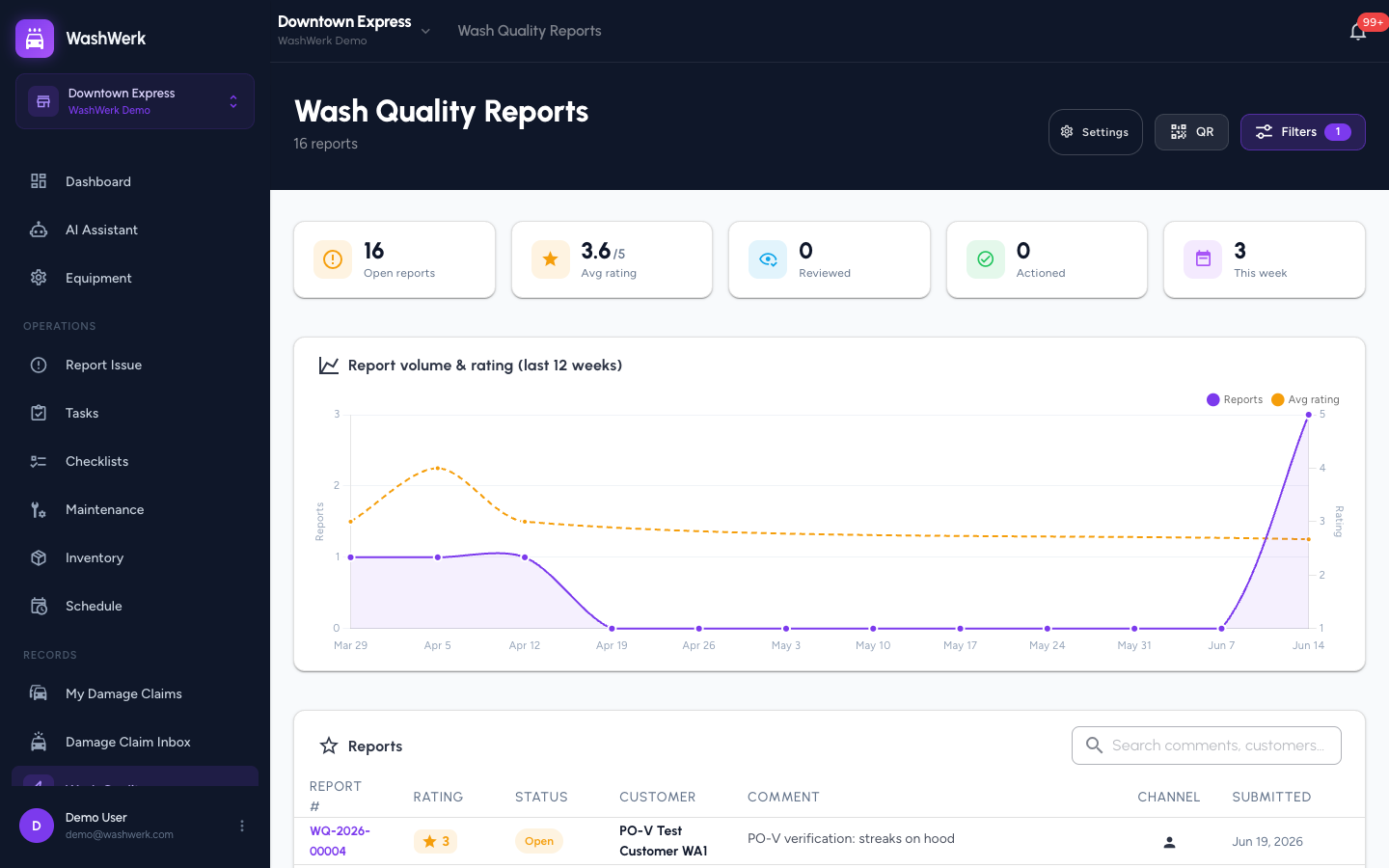
- Open Wash Quality from the navigation. The inbox loads with status summary cards, a ratings trend chart, and the Reports table.
- In the Search box above the table, type to match a customer name, comment text, or report number. The table filters as you type.
Filter the reports
- In the inbox header, select Filters. The filter sheet opens.
- Set any of: Time range (Today, 7d, 30d, 90d, All, or Custom dates), Status (Open, Reviewed, Actioned), Rating (1–5), Channel (QR or Employee), and Equipment.
- Select Apply. The badge on the Filters button shows how many filters are active.
To clear everything, reopen Filters and select Reset.
Open a report
- In the Reports table, select any row (or the eye icon) to open the report. The detail view opens on the Report tab, with a Manager tab alongside it.
The Report tab shows the star rating, customer comment, customer and channel details, and any attached photos. Select a photo thumbnail to view it full size.
Mark a report reviewed
- On the report detail, select Mark reviewed (shown while the report is Open).
- Optional: In the dialog, set the At-fault equipment if you already know which equipment caused the issue. It pre-fills when you record the resolution.
- Select Mark reviewed. The status changes to Reviewed.
Set the at-fault equipment
- On the report detail, open the Manager tab.
- If AI suggested equipment (shown as a chip with a confidence percentage), select the chip to adopt it. Otherwise, use the At-fault equipment picker to choose the equipment yourself.
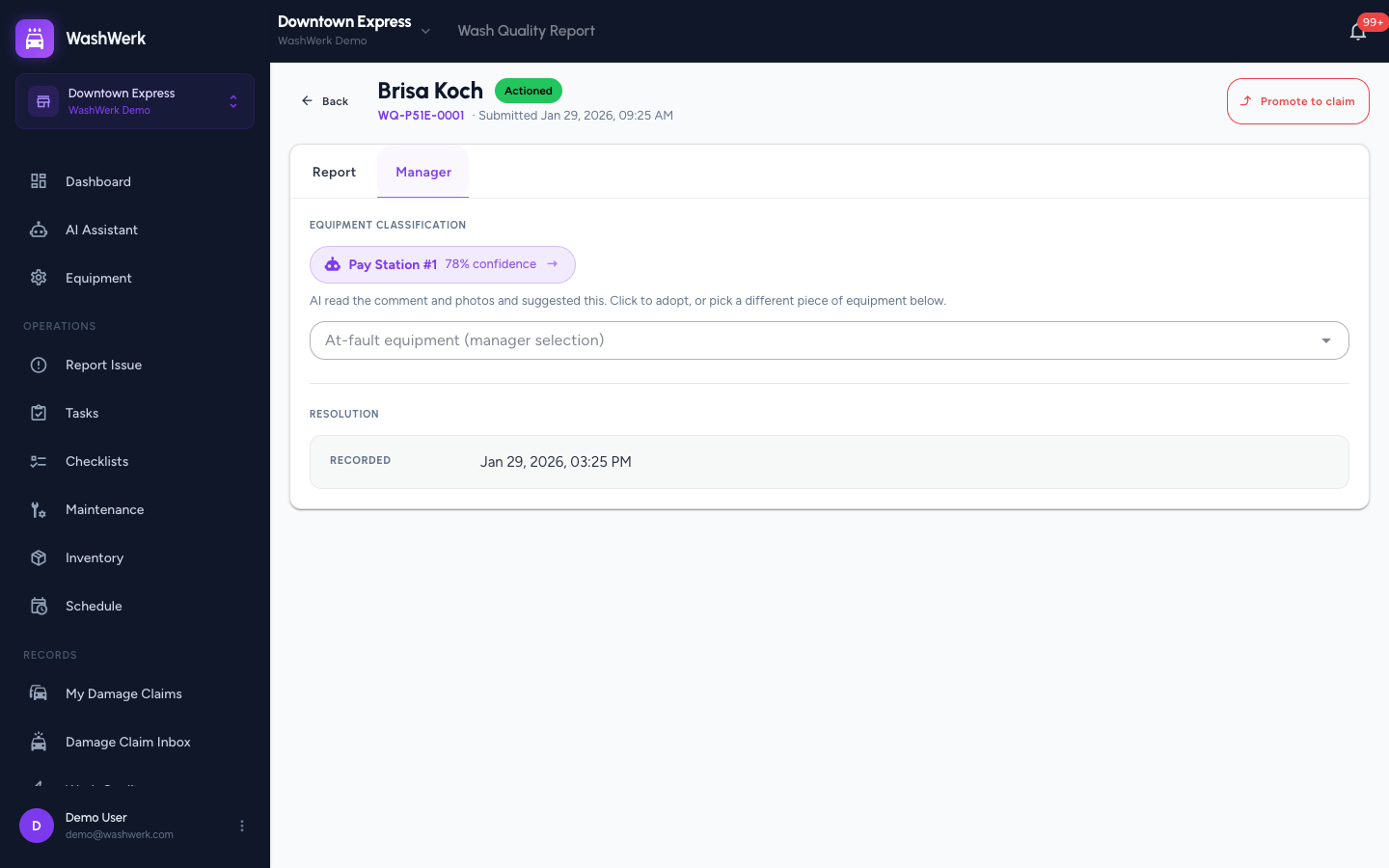
The selection saves immediately — there is no separate save step here.
Record a resolution
- On the report detail, select Record resolution.
- In the dialog, choose a Resolution offered (Rewash, Gift Card, Account Credit, Free Upgrade, No resolution offered, or Other). This field is required.
- Optional: Add Notes and confirm or change the At-fault equipment.
- Select Save. The status changes to Actioned and the resolution appears on the Manager tab.
Promote a report to a damage claim
Use this when the wash caused vehicle damage that needs a formal claim.
- On the report detail, select Promote to claim.
- In the dialog, select Confirm. A new damage claim draft is created with the customer info and photos copied from this report, and you are taken to that claim.
The report then shows a "Promoted to Damage Claim" banner and can't be promoted again.
A note on report photos
Photos are attached when a report is submitted (by the customer on the QR form, or by staff on the New report form). The detail view displays those photos but does not add or remove them after submission.
Expected result
After recording a resolution the report shows the Actioned status with the resolution type, notes, and at-fault equipment on the Manager tab. A promoted report links to its damage claim.
Troubleshooting
- If you don't see Mark reviewed or Record resolution: Mark reviewed only appears while a report is Open; Record resolution is hidden once a report is Actioned. Both require the Review Wash Quality permission.
- If Promote to claim is missing: you need the Promote to claim Wash Quality permission, or the report was already promoted.
- If Save is blocked when recording a resolution: choose a Resolution offered value — it is required.
- If no AI equipment chip appears on the Manager tab: AI either had low confidence or hasn't finished analyzing. Set the equipment manually with the picker.